Best Android Parental Control App - Ximos 2026
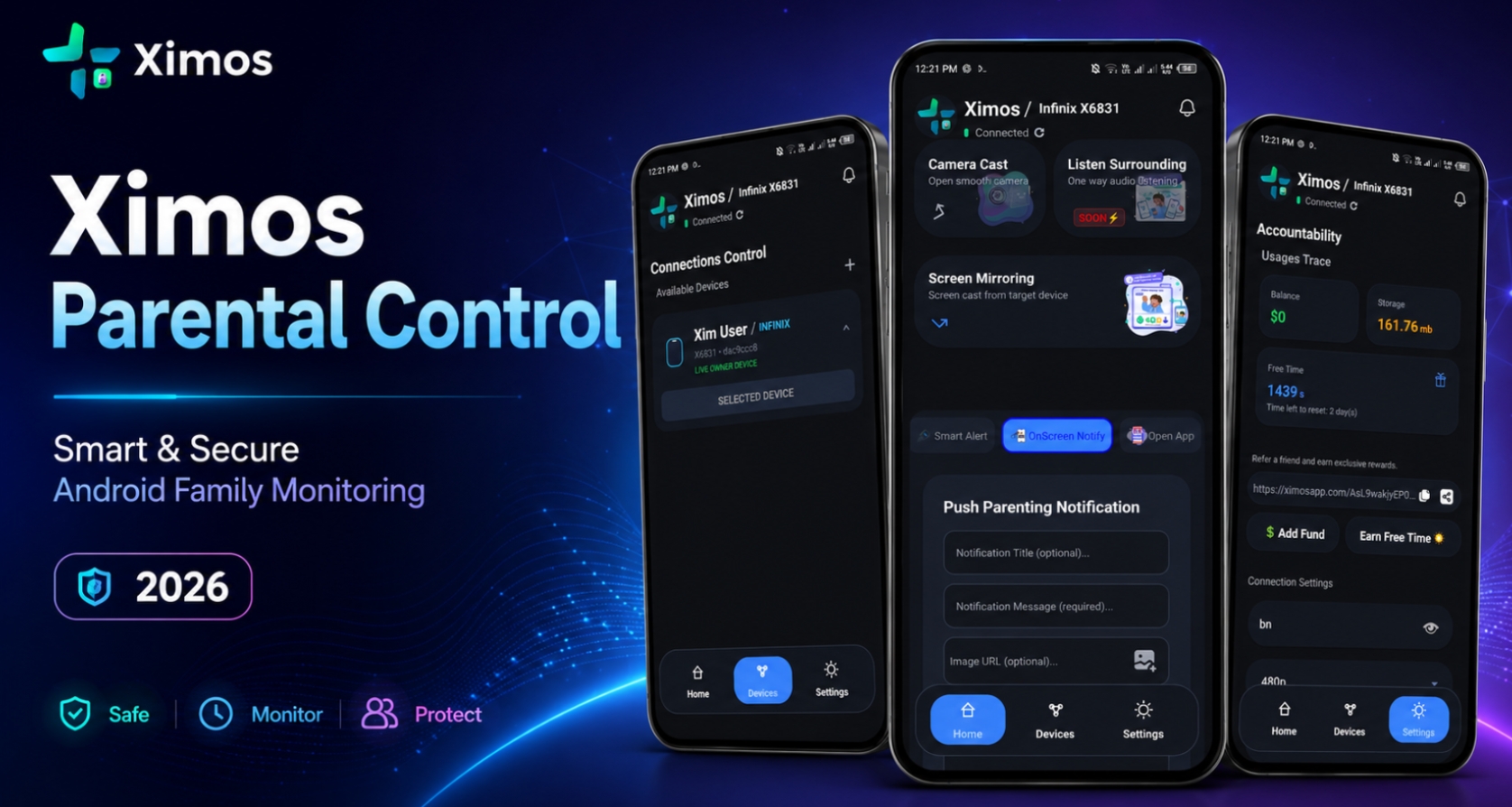
Best Android Parental Control App - Ximos 2026
Ximos is an Android-focused parental control and family device management platform designed to help parents manage and supervise a child's Android device. The platform consists of two connected applications: Ximos, which works as the parent-side control application, and XimosKid, which runs on the supervised child device. Together, they provide features such as screen mirroring, remote control, camera casting, one-way audio, device-usage information, notifications, remote actions, and media capture.
One of the most interesting aspects of Ximos is its pay-as-you-go billing system. Instead of forcing every family into a recurring monthly or three-month subscription, Ximos is designed to let users add balance and use supported paid features according to their actual requirements. The platform also provides free seconds, referral bonuses, reward opportunities, and a periodic free-time reset system, giving new users an opportunity to test the service before spending money.
Privacy is another important part of the Ximos project. According to the project's stated architecture, important device information is not intended to remain permanently stored on the server after the required work is completed. The system may retain limited information such as a device key, device brand name, and email where required for account and device functionality. Photos and videos captured through supported features are separately stored in cloud storage for a stated period of 30 days.
For parents searching for an Android parental control app in 2026, Ximos offers a combination of live monitoring, remote device management, flexible billing, and a web-based dashboard. However, because some features involve sensitive Android permissions such as camera, microphone, screen capture, Accessibility Service, and Device Administration, they should always be used responsibly and only on devices that the parent or guardian is authorized to supervise.
What Is Ximos Parental Control App?
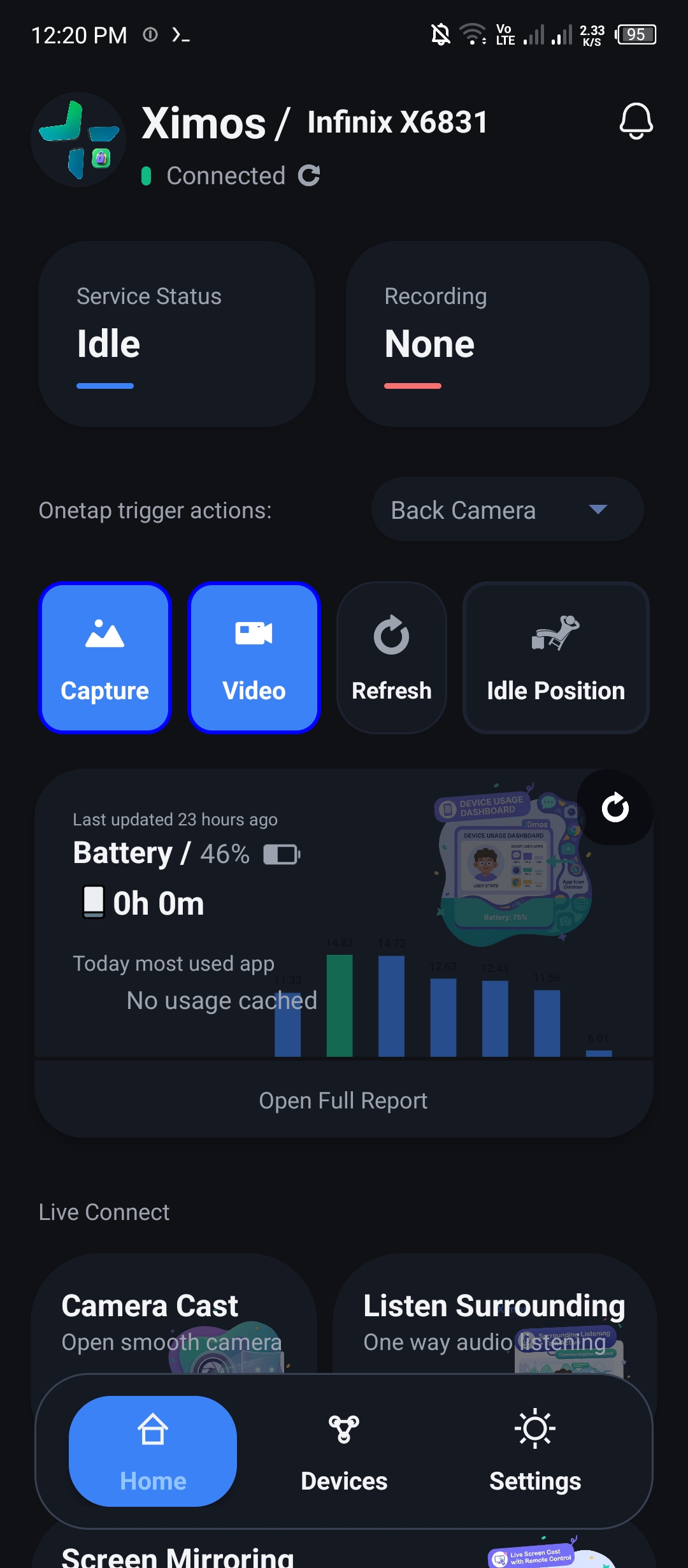
Ximos is designed to provide parents with a centralized way to supervise and manage supported functions on a child's Android smartphone. Rather than focusing only on traditional screen-time statistics, the platform combines activity information with live device-management tools. A parent can use supported features to view the child's screen, remotely control certain functions, cast the camera, receive audio, review captured media, send notifications, and perform selected remote actions.
The basic concept is similar to having a parent dashboard connected to a supervised Android device. Ximos runs on the parent side, while XimosKid provides the connection to the child's device. When a parent requests an available feature, the child-side application performs the necessary operation using Android's authorized APIs and permissions. The resulting information is then made available through the parent interface.
This approach makes Ximos different from parental-control applications that concentrate exclusively on application blocking or daily screen-time limits. Those conventional features are useful, but some parents may also need occasional real-time visibility or remote assistance. For example, a parent might want to help a child with a technical problem without physically taking the phone, or check a supported device-management function remotely.
At the same time, Ximos should be viewed as a family supervision tool, not a general-purpose hidden surveillance application. Features involving cameras, microphones, screen capture, clipboard access, and remote control are sensitive. Parents should establish clear household rules about monitoring and use the application only where they have appropriate authority.
The official Ximos platform is available at ximosapp.com, where users can access the web application, account system, documentation, blog, gallery, rewards, feedback, and legal information.
Ximos and XimosKid: The Two-App System
The Ximos ecosystem is built around two Android applications with different responsibilities. Ximos is the parent application, while XimosKid operates on the supervised child device. This separation allows the parent interface to concentrate on controls and information while XimosKid handles the Android-specific permissions and services required for supported device functions.
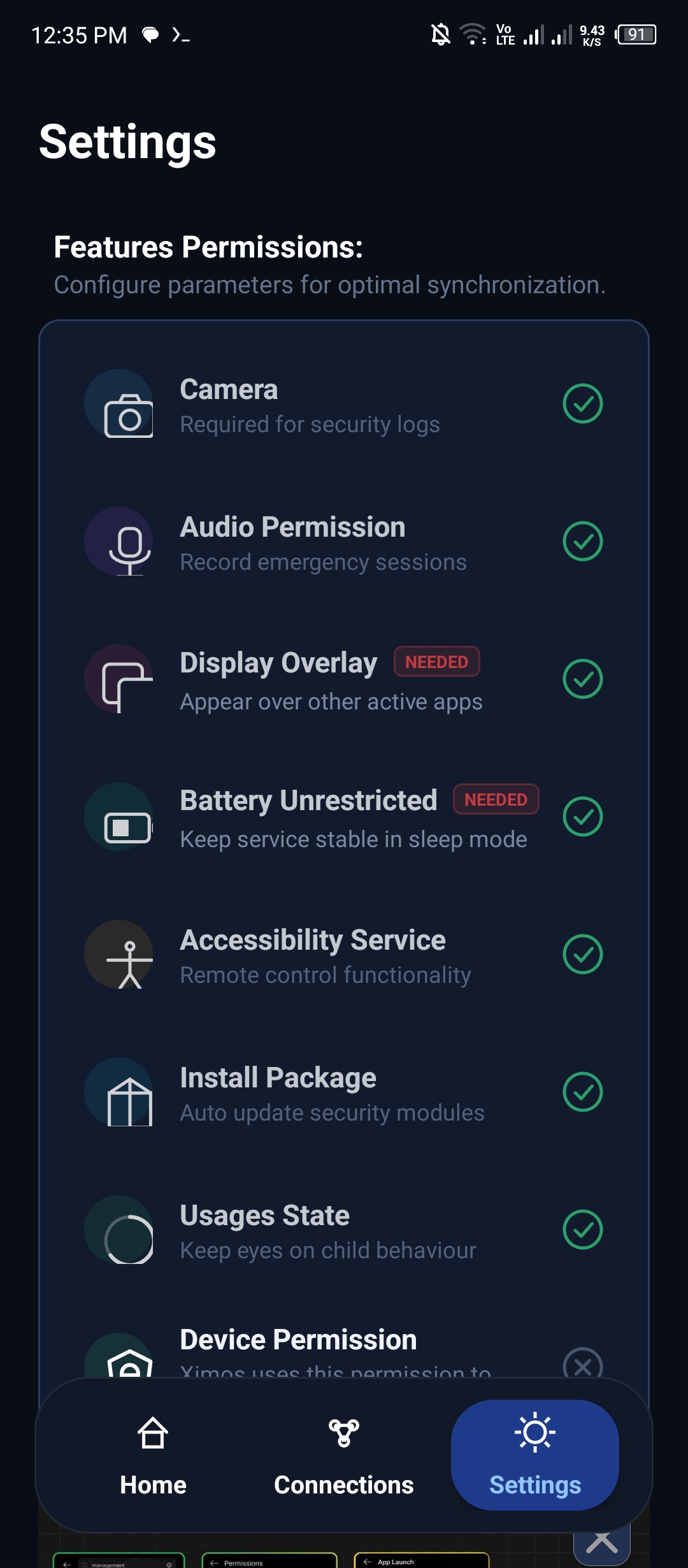 The child application may request several permissions because features such as screen mirroring, camera streaming, audio recording, usage statistics, overlays, and remote-management functions require access to Android system capabilities. Rather than being ordinary background features, these capabilities depend on permissions that Android provides specifically for sensitive device operations.
The parent application then provides a centralized interface through which the parent can access available information and issue supported commands. The project's web version extends this concept further by allowing parents to use ximosapp.com as another control interface.
This two-app architecture can be useful because the parent and child devices have different roles. The parent device does not need to perform the same operations as the supervised device. Instead, XimosKid provides the necessary information and functionality from the target Android device.
Parents should always make sure that XimosKid is installed only on a device they are authorized to supervise. Because the application can request powerful permissions, users should read the permission explanations and Android system prompts before enabling each capability.
Who Can Benefit From Ximos?
Ximos is primarily intended for parents and guardians who want additional control and visibility over Android devices used by their children. Different families have different requirements, so the usefulness of a parental-control platform depends heavily on the features a household actually needs.
Some parents may primarily want to understand how a child is using a smartphone. Others may need occasional screen viewing, remote assistance, camera casting, or notifications. Ximos attempts to put these functions into one ecosystem rather than requiring parents to install several unrelated applications.
The platform can also appeal to parents who do not want to pay for an expensive subscription when advanced features are only used occasionally. Its usage-based credit approach allows users to consume supported paid features according to their needs rather than automatically paying for an entire billing period.
However, parental-control technology works best when combined with communication. Children should understand the family's device rules, and parents should use monitoring tools proportionately. No application can replace conversations about online safety, privacy, responsible technology use, and appropriate digital behavior.
Ximos can therefore be considered a technical layer for family supervision. It provides information and controls, while parents remain responsible for deciding when those controls are appropriate.
Why Ximos Stands Out in 2026
The parental-control market contains many different types of products, including screen-time applications, content filters, location tools, family safety platforms, and device-management solutions. Ximos takes a somewhat different approach by combining several real-time device functions with a flexible billing system.
Its most noticeable commercial feature is the pay-as-you-go model. Traditional parental-control applications frequently use monthly or multi-month subscriptions. That can be inconvenient for parents who only need advanced monitoring occasionally. Paying for a long subscription when a feature is used for only a few days can feel inefficient.
Ximos attempts to solve that problem through usage-based balance, free seconds, reward credits, and referral bonuses. Users can add funds when necessary and use supported paid features according to their actual requirements.
Another major point is the project's stated approach to data minimization. According to the provided specifications, important information from the supervised device is not intended to remain permanently on the server. The platform may need limited identifiers such as a device key, brand name, and email for operational purposes, while other information is transferred between the child and parent applications.
The platform also provides a web interface, making Ximos more accessible than an Android-only parent dashboard. Parents can log into the website and access supported management functions, their gallery, rewards, feedback tools, and account information.
Real-Time Device Monitoring
Real-time device monitoring is one of the most prominent parts of Ximos. The platform supports screen mirroring with remote control, allowing a parent to view the supervised Android device through the parent interface and use supported controls.
This can be useful for ordinary family situations. For example, a parent might want to help a child troubleshoot an application or understand what is happening on the device without physically holding the phone. Remote management can also be useful when a child needs assistance while away from home.
Ximos uses Android's MediaProjection capabilities for screen mirroring. Because Android treats screen capture as a sensitive operation, the child-side application needs the appropriate permission and system authorization.
The platform also provides camera casting and audio-related functions. These capabilities are more sensitive than ordinary usage statistics because cameras and microphones can reveal information from the surrounding environment.
For that reason, parents should use live monitoring responsibly and only within the boundaries of legitimate parental supervision. A live device view can potentially expose private conversations, passwords, photographs, or other personal information.
The goal should not be to monitor everything simply because the technology allows it. Instead, parents can use real-time features when they have a clear reason to do so.
Pay-As-You-Go Billing
Ximos's pay-as-you-go billing model is one of its biggest differences from traditional parental-control subscriptions.
Instead of requiring users to purchase a recurring plan simply to maintain access, Ximos is designed around a balance system. According to the project information, the minimum deposit is $1 through the stated payment system, although users should always verify current payment options and pricing directly on the official Ximos platform.
This model can make sense for occasional users. Imagine a parent who needs live screen casting only a few times during a month. A conventional subscription might charge the same recurring amount regardless of how little the feature is actually used.
Ximos attempts to connect the cost more closely to actual usage. Users can add balance when they need additional paid usage, while free seconds and rewards can provide additional opportunities to use selected features.
The platform's billing system should still be checked carefully before payment. Pricing, credit conversion rates, supported payment methods, and usage rules may change as the project develops.
For parents comparing parental control apps in 2026, the pay-as-you-go model is an important feature to consider, particularly for families that prefer flexible rather than recurring payments.
Privacy-Focused Data Handling
Privacy is especially important for parental-control applications because the software may interact with information from a child's personal device.
According to the project's supplied description, Ximos is designed to minimize permanent server-side retention. The service identifies Device Key, Brand Name, and Email as information that may be required for specific operational purposes, while important device information is not intended to remain permanently stored after the relevant work is completed.
The project also states that information is sent from XimosKid to the parent application and is not intended to be provided to third parties.
However, users should always distinguish between a project's stated architecture and the current legally applicable privacy policy. Software infrastructure can change, and new features can introduce new data requirements.
The platform also states that captured photos and videos are stored in cloud storage for 30 days. This means the capture feature should be considered separately from the general claim about minimizing permanent server storage.
Parents should read the current Privacy Policy, Terms of Use, Disclaimer, and other legal documentation available on Ximos's official website before using the service.
Good privacy design involves more than deleting information. It also involves collecting only what is necessary, limiting access, protecting accounts, securing communication, and clearly explaining what the application does.
XimosKid Child App Permissions Explained
XimosKid requires several Android permissions because its functionality goes beyond ordinary application monitoring. Each permission exists to support a particular capability.
Parents should never grant permissions blindly. Android permission prompts should be reviewed carefully, and only the features actually required by the family should be enabled.
The project currently describes permissions related to camera, audio recording, overlay windows, MediaProjection, Accessibility Service, Device Administration, package installation, and Usage Manager access. Location permission may also be added in the future if location tracking is implemented.
These permissions have different levels of sensitivity. Camera and microphone access can expose real-world surroundings, while screen capture can reveal almost everything visible on a phone display. Accessibility and device-administration capabilities can also provide extensive device-management functionality.
The safest approach is to understand why each permission is requested before enabling it.
Camera, Microphone, Overlay, and MediaProjection
Ximos uses Camera and Audio Record permissions for live camera streaming and one-way surrounding audio functionality.
Camera access allows XimosKid to use the device camera for supported live casting and capture features. Audio recording provides the microphone access required for the platform's audio functionality.
MediaProjection is used for screen mirroring. Android provides MediaProjection as a controlled mechanism for applications that need to capture the device display.
The project also uses Overlay Window functionality for supported interface elements, including alert windows and notifications that can appear over other content.
Because these are sensitive capabilities, parents should understand what each one enables before activating it. A camera or microphone can potentially capture information involving people other than the child, while screen mirroring may display private conversations or account information.
Responsible use means limiting these features to appropriate family-supervision situations and respecting the privacy of people who may be near the supervised device.
Accessibility and Device Administration
Ximos describes Accessibility Service as primarily being required to control the screen-mirroring time screen and states that it is not intended for unrelated functionality.
Android's Accessibility Service is a powerful system capability, so applications using it should have a clearly defined purpose and comply with the platform's applicable requirements.
Ximos also uses Device Admin Permission to make unwanted uninstallation more difficult. The project describes this as a way to prevent the child from suddenly removing the supervision application.
The supplied project information also states that an uninstall notification is provided and that the administrator can subsequently be disabled before the application is uninstalled.
Device administration should never be understood as a permanent lock on a device. Android provides users with mechanisms for managing administrator privileges, and those system mechanisms should be respected.
Parents should explain to children why the supervision application is installed and establish clear family rules around its use.
Usage Access and Other Permissions
Usage Manager or Usage Access permission allows XimosKid to obtain information about device usage.
This can include information such as how long the screen has been active, how long particular applications have been used, and other supported device statistics. The project also mentions battery and Wi-Fi usage information.
This type of data can help parents understand general device habits without necessarily requiring continuous live screen viewing.
The project also describes Package Install Permission for the application's in-app update mechanism. The supplied information states that the user will not be able to click the update button directly.
Location permission may be introduced in a future version if Ximos adds location tracking.
As Android evolves, permissions and background-access rules can change. Therefore, parents should always follow the current Android prompts and Ximos documentation rather than assuming that an older setup procedure will behave identically on every device.
Ximos Parental Control Features
Ximos provides a broad collection of features designed around remote supervision and Android device management.
The main available features include:
- Screen mirroring with remote control
- Camera casting with audio listening
- One-way audio listening
- Photo and video capture
- Window overlay alerts
- Clipboard text sending
- On-screen notifications
- FCM off-screen real notifications
- Remote application opening by package name
- Opening links in Chrome
These functions make Ximos more than a basic screen-time tracker. The platform is designed to provide parents with both information and selected remote actions.
The feature set also explains why the child application requires several Android permissions. Live functionality requires considerably more system access than a simple application-usage counter.
Parents should enable features according to their actual needs. A family that only wants application usage information may not need live camera or microphone functionality.
Screen Mirroring and Remote Control
Screen Mirroring with Remote Control is one of the primary Ximos features.
The parent can use the supported Ximos interface to view the supervised device's screen and perform available remote actions. This can be especially helpful for technical assistance.
For example, if a child is having difficulty using an application, a parent may be able to see the problem remotely rather than trying to explain every step verbally.
The feature depends on Android screen-capture technology and therefore requires the appropriate MediaProjection authorization.
Because the screen may contain passwords, private messages, photos, or other sensitive information, parents should treat screen mirroring as a high-sensitivity feature.
The pay-as-you-go model also becomes relevant here because live screen streaming consumes usage credits according to the service's current billing rules.
Camera Casting and One-Way Audio
Ximos supports Camera Casting with Audio Listening as well as a separate one-way audio feature.
Camera casting allows the parent interface to receive a live camera stream from the supervised device when the required permissions and functionality are enabled.
One-way audio allows supported audio from the supervised device to be accessed by the parent application.
These features can be useful in specific family-safety circumstances, but they are among the most privacy-sensitive capabilities in the application.
Parents should ensure that the supervised device is being used within an authorized parental-control context and should avoid using the functionality to secretly monitor unrelated people.
Android's camera and microphone permissions should remain enabled only when appropriate.
Photos, Videos, and Cloud Gallery
Ximos supports photo and video capture, with captured media accessible through its dedicated gallery.
The project information states that these captures are stored in cloud storage for 30 days.
The web gallery is available through:
https://ximosapp.com/app/gallery
A limited retention period can be useful because it provides temporary access to recent captures without creating an indefinite media archive.
The project also describes a 250 MB cloud-storage bonus associated with the initial account system.
Parents should remember that video files can consume storage quickly, particularly if captures are high resolution or long in duration.
For that reason, the gallery is best viewed as a temporary review area rather than unlimited permanent storage.
Alerts, Clipboard, Notifications, and Remote Actions
Ximos includes several additional remote-management functions.
Window Overlay Alert can display an alert window on the supervised device. On-Screen Notification can send information directly to the child's screen, while FCM-based notifications can provide real-time notifications even when the application is not actively visible.
The platform also supports sending clipboard text and remotely opening an application by its package name.
Another supported command can open a link through Chrome on the supervised device.
These features can be useful for parents who need to communicate or initiate a specific action remotely.
Clipboard functionality should receive particular attention because clipboard contents can include sensitive information. It should therefore be used only for legitimate parental-management purposes.
Ximos Web Version at Ximosapp.com
Ximos also provides a web-based parental-control interface at:
The website acts as the central online location for the Ximos ecosystem.
The main available pages include:
- Homepage:
ximosapp.com - Login/Register:
ximosapp.com/auth - Privacy Policy:
ximosapp.com/uno/ - Open Source Licenses:
ximosapp.com/uno/#open-source-licenses - Disclaimer:
ximosapp.com/uno/#disclaimer - Terms of Use:
ximosapp.com/uno/#terms-of-use - Parent Control Dashboard:
ximosapp.com/app - Gallery:
ximosapp.com/app/gallery - Rewards:
ximosapp.com/app/reward - Blog:
ximosapp.com/blog/ - Feedback:
ximosapp.com/feedback/
The web version is useful because parents can access supported controls from a browser instead of depending entirely on the parent Android application.
Dashboard, Gallery, Rewards, and Feedback
The Ximos Dashboard is the main control center.
From the /app section, an authenticated parent can access the supported device-management functions.
The /app/gallery section focuses on stored photo and video captures.
The /app/reward page is designed around earning credits that can be used for eligible live functions.
The Ximos Blog provides a place for articles, updates, and information, while the feedback page allows users to communicate problems or request features.
The legal section also provides access to important documentation, including privacy information, open-source licenses, disclaimers, and terms of use.
Having these resources available through one official website gives users a central location for both product functionality and documentation.
How Ximos Credits and Free Seconds Work
One of Ximos's most unusual features is its free-seconds and credit system.
According to the supplied project information, a newly created account normally receives 720 seconds of bonus usage.
Users who join through a referral can receive 1,080 seconds according to the described referral system.
The initial account system also includes 250 MB of cloud storage for supported captures.
After the free seconds are used, users can potentially earn additional credits through reward advertisements.
The project description states that the daily reward-ad limit is approximately 50–60 ads, although this should be treated as a current-product detail that may change.
Ximos also describes a free-time reset every 19 days. When eligible, the user can reset the free-time allocation and receive another 720 seconds.
This system is designed to give users a recurring opportunity to access selected live features without requiring a conventional subscription.
Signup, Referral, Rewards, and Reset System
The basic Ximos reward structure can be summarized as follows:
| Benefit | Described Amount |
|---|---|
| Standard signup bonus | 720 seconds |
| Referral bonus | Up to 1,080 seconds |
| Initial cloud storage | 250 MB |
| Free-time reset cycle | 19 days |
| Reward advertisements | Approximately 50–60 daily limit |
These values are based on the supplied project specifications and may change as Ximos develops.
The referral system can provide additional starting time, while reward ads provide another way to earn credits after the initial bonus has been consumed.
The 19-day reset is particularly interesting because it gives eligible users another opportunity to receive free usage instead of treating the initial trial as a one-time event.
Parents who need substantially more live usage can use the balance system instead.
Users should always check the current Ximos dashboard for the latest reward, referral, pricing, and credit conditions.
Upcoming Ximos Features
Ximos's planned features include:
- SOS trigger
- Location tracking
- Fast file sharing between two phones
- Screen and app time control
These future features could significantly expand the platform's traditional parental-control capabilities.
An SOS function could provide a quick way for a child to request parental attention.
Location tracking could add another family-safety feature for parents who need location awareness and have the appropriate authorization.
Fast file sharing could make communication between connected family devices more convenient.
Screen and application time controls would also make Ximos more competitive with conventional parental-control services that focus heavily on usage limits.
These features are currently described as future functionality, so availability should be verified through the official Ximos website before relying on them.
Privacy, Consent, and Responsible Parental Monitoring
Parental-control technology should always be used with privacy, consent, and responsible supervision in mind.
A child's smartphone can contain highly personal information, including conversations, photographs, school information, account credentials, browsing activity, and private communications.
For that reason, parents should understand what every enabled Ximos permission does.
Camera, microphone, screen capture, clipboard, and cloud-storage functionality should be treated as sensitive features.
Parents should use Ximos only where they have appropriate authority to supervise the device and should avoid using its capabilities to secretly monitor people outside the intended family-supervision context.
The current project description emphasizes limited server-side retention and states that important information is not intended to remain permanently on the server.
The description also specifies a 30-day cloud storage period for captured photos and videos.
Nevertheless, users should read the latest Privacy Policy directly from Ximos because actual data practices can change as the service evolves.
Account security is equally important. Parents should use strong passwords, avoid sharing credentials, and secure the device used to access their Ximos account.
Is Ximos the Best Parental Control App in 2026?
There is no single parental-control app that is automatically the best choice for every family.
However, Ximos has several features that make it an interesting option for parents looking for an Android parental control app in 2026.
Its strongest differentiators include:
- Two-app Android architecture
- Live screen mirroring
- Remote screen control
- Camera casting
- One-way audio
- Photo and video capture
- Temporary cloud gallery
- Remote notifications
- Remote application launching
- Chrome link opening
- Web-based parent dashboard
- Pay-as-you-go billing
- Free seconds
- Referral bonuses
- Reward credits
The pay-as-you-go system may be particularly attractive to occasional users who do not want to maintain a recurring subscription.
At the same time, parents who mainly need content filtering, traditional scheduled screen limits, or a mature family-management ecosystem should compare Ximos with other parental-control solutions.
Ximos is an evolving project, and its future roadmap indicates that screen-time controls, location tracking, SOS, and file sharing may broaden its capabilities.
The best choice ultimately depends on the family's needs, the child's Android device, privacy expectations, and which features are actually available at the time of installation.
Conclusion
Ximos offers a distinctive approach to Android parental control in 2026 by combining live monitoring, remote device management, usage information, cloud captures, a web dashboard, and a flexible credit-based billing system.
The two-app architecture separates the parent experience from the supervised child device. Ximos provides the parent-side controls, while XimosKid handles the Android permissions and device-side functionality.
Features such as screen mirroring, remote control, camera casting, one-way audio, photo and video capture, notifications, clipboard functionality, application launching, and Chrome link opening provide a broad set of tools for authorized parental supervision.
Its billing model is another major differentiator. Instead of depending entirely on monthly subscriptions, Ximos uses a combination of balance, free seconds, reward credits, referral bonuses, and a described 19-day reset mechanism.
Privacy also plays an important role in the project's design, with the supplied specifications emphasizing limited server-side retention and a 30-day period for cloud-stored captures.
Because Ximos can access sensitive Android capabilities, responsible use is essential. Parents should review permissions, read the current privacy documentation, secure their accounts, and use the platform only for legitimate and authorized family supervision.
For parents searching for a flexible Android parental control app with real-time monitoring features, Ximos is a platform worth exploring.
Visit the official website to learn more:
FAQs
Is Ximos available for Android?
Yes. Ximos is designed primarily for Android devices and uses two applications: Ximos for the parent and XimosKid for the supervised child device. The platform also provides a web interface through ximosapp.com.
What is XimosKid?
XimosKid is the child-side Android application used on the supervised device. It provides the permissions and functionality required for supported features such as screen mirroring, camera casting, audio features, usage information, notifications, and remote device management.
Does Ximos use a monthly subscription?
Ximos is designed around a pay-as-you-go billing system rather than relying exclusively on recurring subscriptions. Users can add balance for supported paid usage and can also receive free seconds and reward credits. Current prices and conditions should be checked on the official website.
How does Ximos handle user data?
According to the supplied project specifications, Ximos is designed to minimize permanent server-side retention of important device information. The project states that limited identifiers such as device key, brand name, and email may be needed for operation. Captured photos and videos are described as being stored in the cloud for 30 days. Users should read the current official Privacy Policy for the latest details.
Where can I access Ximos?
The official Ximos website is:
The platform provides account registration, the parent dashboard, gallery, rewards, blog, feedback, and legal-information pages.
You can also use the provided referral link:
https://ximosapp.com/AsL9wakjyEP03cn8suvq8rGEiFA2/?t=1787465384938
Leave a Comment
Comments
Loading comments...